
Find the commit that broke something (bisect)
The problem
Section titled “The problem”It worked last week. Since then, 400 commits have landed and now something is broken. You could read them one by one, but that takes an afternoon, and the commit that did it is often not the one that looks suspicious.
The idea
Section titled “The idea”Bisect is the “guess a number between 1 and 1000” game, played on your history. You tell the app one commit where the problem is not there (good) and one where it is (bad). The app jumps to the commit in the middle and asks: does it happen here?
- If yes, the culprit is in the older half. The newer half drops out.
- If no, the culprit is in the newer half. The older half drops out.
Here is a search over 16 commits where commit 6 is the culprit. Commit 1 is known to be good and commit 16 is known to be bad. Four questions are enough:
Every answer cuts the remaining commits in half, so you need far fewer steps than you would think:
| Commits between good and bad | Questions you answer |
|---|---|
| 10 | about 4 |
| 100 | about 7 |
| 1,000 | about 10 |
| 1,000,000 | about 20 |
At the end, the app shows the first bad commit: the one where it started going wrong.
How to use it
Section titled “How to use it”-
Open History (
Ctrl+2). -
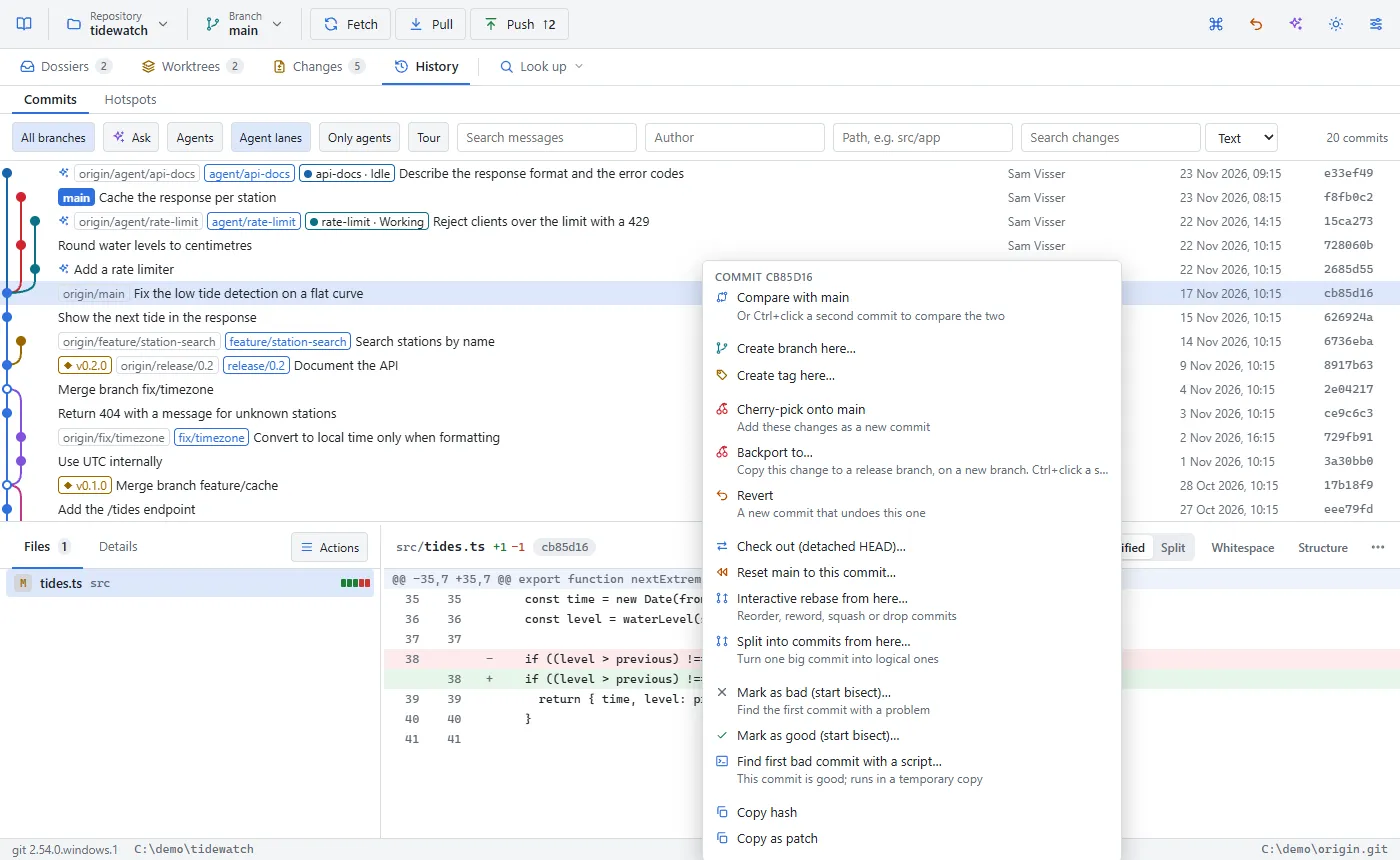
Right-click a commit where you see the problem and choose Mark as bad (start bisect)… Or right-click a commit where everything still worked and choose Mark as good (start bisect)…
-
In the dialog, give the other side as a branch, tag or hash. You can leave it empty and mark the other commit in History later.
-
A bar appears at the top. The app has checked out a commit in the middle. Try your problem, then press one of:
- Good: the problem is not there in this commit.
- Bad: this commit has the problem.
- Skip: this commit can’t be tested, for example because it doesn’t build. Bisect picks a neighbour instead.
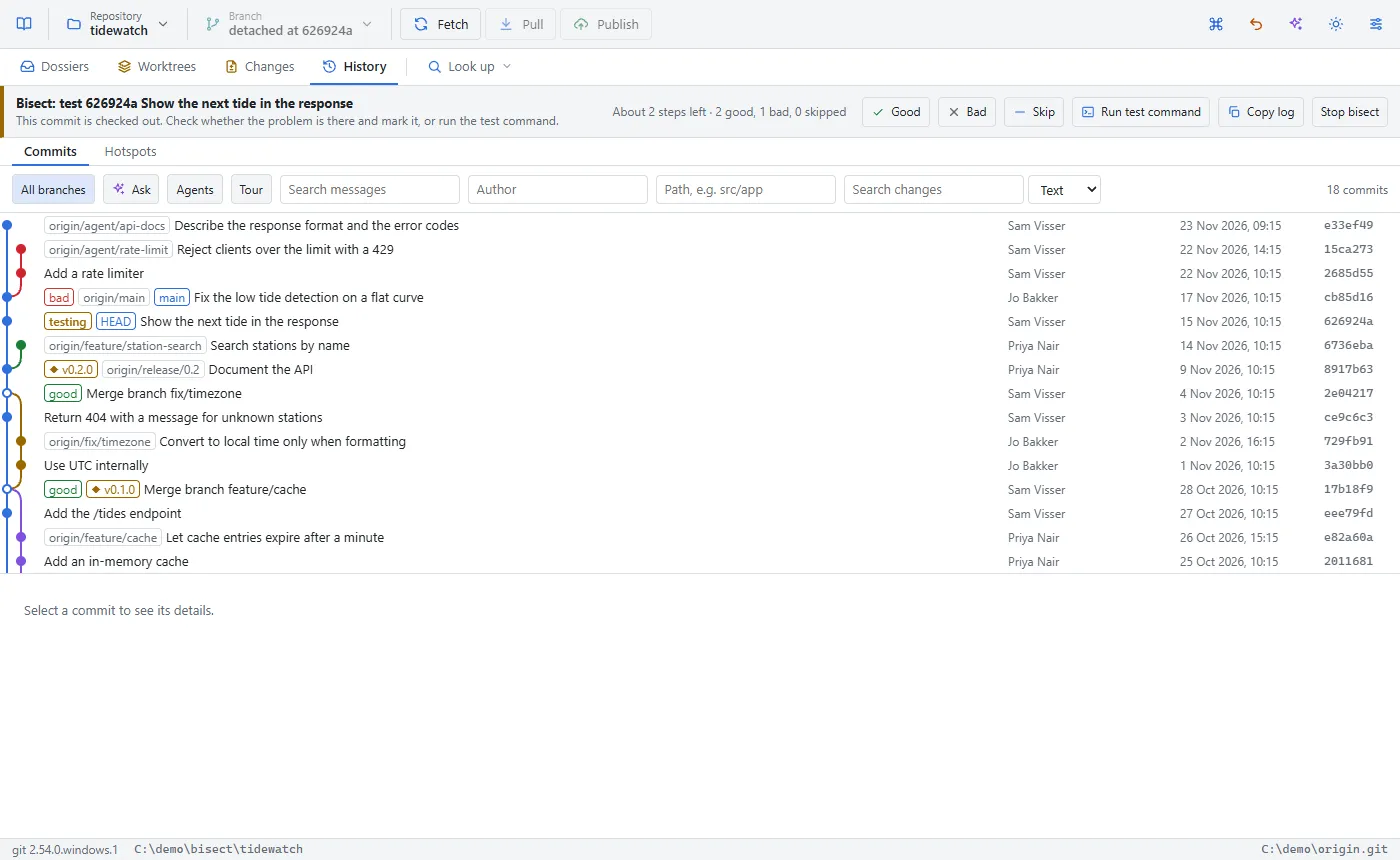
The bar says how far you are, for example About 2 steps left. History marks the commits you have answered as good and bad, and the one you are testing as testing.
-
Repeat until the bar names the first bad commit, then press Show commit to open it in History.
-
Press Stop bisect when you’re done. This takes you back to where you were before. The app keeps the log of the bisect you stopped (the commands
git bisect logshows), so you can pick it up again later.
Copy log in the bar puts that log on the clipboard, to keep it or share it. After you stop, right-click a commit in History and choose Replay last bisect to get the same marks back and carry on with the next commit to test. It is refused while another operation is running or when tracked files have uncommitted changes, like starting a bisect.
Let the app do the testing
Section titled “Let the app do the testing”If you have a command that fails when the problem is present (a test, a build, a script), press Run test command. The app runs it on every step and answers good or bad from the result, until it finds the commit. Each step is listed with its exit code, duration and output, and Cancel run stops it whenever you like.
A bisect started with --no-checkout
Section titled “A bisect started with --no-checkout”If you started the bisect in a terminal with git bisect start --no-checkout, git does not touch your files, so the
app has nothing checked out to test. Run test command then tests every commit in a temporary copy of it: the
app writes that commit’s files to a folder in your temp folder (without .git), runs the command there, and removes
the folder again. Your own files, your branch and your uncommitted changes stay as they are. The output of each step
says so. Two things differ from a normal run: the copy is fresh, so a build that needs installed dependencies or
generated files has to make them itself, and a command that needs the repository (git describe, a version from a tag)
will not work in it. Submodules are empty folders in the copy.
A test command is the faster route when you have one. If you don’t, bisect by hand still works, and you only have to be able to tell broken from fine on each step.
Find the first bad commit with a script
Section titled “Find the first bad commit with a script”No test command, only a symptom? Write a small script that fails where the problem is and succeeds where it isn’t, then right-click a commit that is still fine in History and choose Find first bad commit with a script. Paste the script, check the good commit (the one you clicked) and the bad commit (empty means HEAD), and tick the box that says you have read the script.
The script runs on your computer with your permissions, so the app only runs it after you confirmed the text
you see. It runs with sh: exit code 0 is good, 125 means this commit can’t be tested, 1 to 127 is bad.
- A throwaway copy. The search runs
git bisect runin a temporary worktree. Your working folder, your branch, your uncommitted changes and any bisect of your own are not touched, and the worktree is removed afterwards. A snapshot of your working folder is taken first anyway. - A check first. The script must fail on the bad commit and succeed on the good one. If it doesn’t, the search stops before it starts and says which side was wrong, so a script that tests something else is caught early.
- Progress and result. The dialog shows how many commits were tried and the output. At the end it shows the first bad commit with the request and approach that an agent recorded for it, if there are any.
- The script file. It lives in a temporary file outside the repository and is deleted when the search ends, unless you tick Keep the script file afterwards; the dialog then shows where it is.
Under the hood
Section titled “Under the hood”The app runs git bisect start, then git bisect good, git bisect bad and git bisect skip for
your answers, and git bisect run for Run test command. Nothing is stored outside git, so
a bisect you start here shows up in the terminal too, and the other way around.
When it goes wrong
Section titled “When it goes wrong”- Bisect never ends in a single commit. If you skipped commits next to the culprit, git can only tell you which few are possible. The bar lists them as buttons so you can look at each.
- You answered wrongly at some step. Stop the bisect and start again. A single wrong answer sends the search the wrong way, and you won’t notice until the result looks odd. Replaying the last bisect brings the wrong answer back too; copy the log, edit out the bad line and start over if you need to.
- You have uncommitted changes. Bisect checks out other commits, so commit or stash first. The app takes a snapshot of your uncommitted work before risky actions, but it is better not to depend on that.
Related
Section titled “Related”Blame tells you who last touched a line. Bisect tells you which change introduced a behaviour, which isn’t always a line you can point at.