
Fix Windows problems (Repository health)
The problem
Section titled “The problem”A repository that works on your machine can fail on a colleague’s. The usual causes are not bugs in your code but in what the files are called and how they are stored:
- a file path so long that Windows cannot create it,
- two files whose names differ only in capital letters, which Windows and macOS treat as one,
- two names that look identical but differ in how an accent is stored (
éas one character or aseplus a loose accent), which macOS treats as one, - a file called
aux.txt, which Windows reserves for an old device, - text files with different line endings from commit to commit, so that every line shows as changed,
- a huge file that every clone has to download for ever.
Git itself says little about these. Repository health looks for them in one go.
The idea
Section titled “The idea”The check reads the list of files git tracks (the index) and judges the names and sizes. It does not
need Windows: on Linux or macOS it warns you about what will break for your Windows colleagues.
Only the path-length check depends on where the folder is. On other systems it measures as if the
repository sat directly under C:\.
It reports seven checks, each with a badge: OK, Note (good to know) or Fix (worth acting on). Nothing is changed until you press a button.
The check also runs by itself, once per repository per session, a few seconds after you open it. It runs in the background, stops if you switch or close the repository, and skips repositories with more than 50,000 files. It only speaks up when something needs a fix: a bar under the top bar says which checks found something, with Review… (opens this dialog) and Dismiss. If everything is fine, or the check fails, it stays silent.
How to use it
Section titled “How to use it”- Open the Repository menu in the top bar and choose Repository health…. (The command palette has it too.) You need an open repository.
- Wait for “Checking the repository…”. The dialog says how many files it checked, and “Everything looks fine.” if nothing needs a fix.
- Read the checks. Under each that has findings you get the paths, up to 200 per check, with “And N more.” for the rest.
- Use a fix button where there is one, or fix it yourself and press Check again.
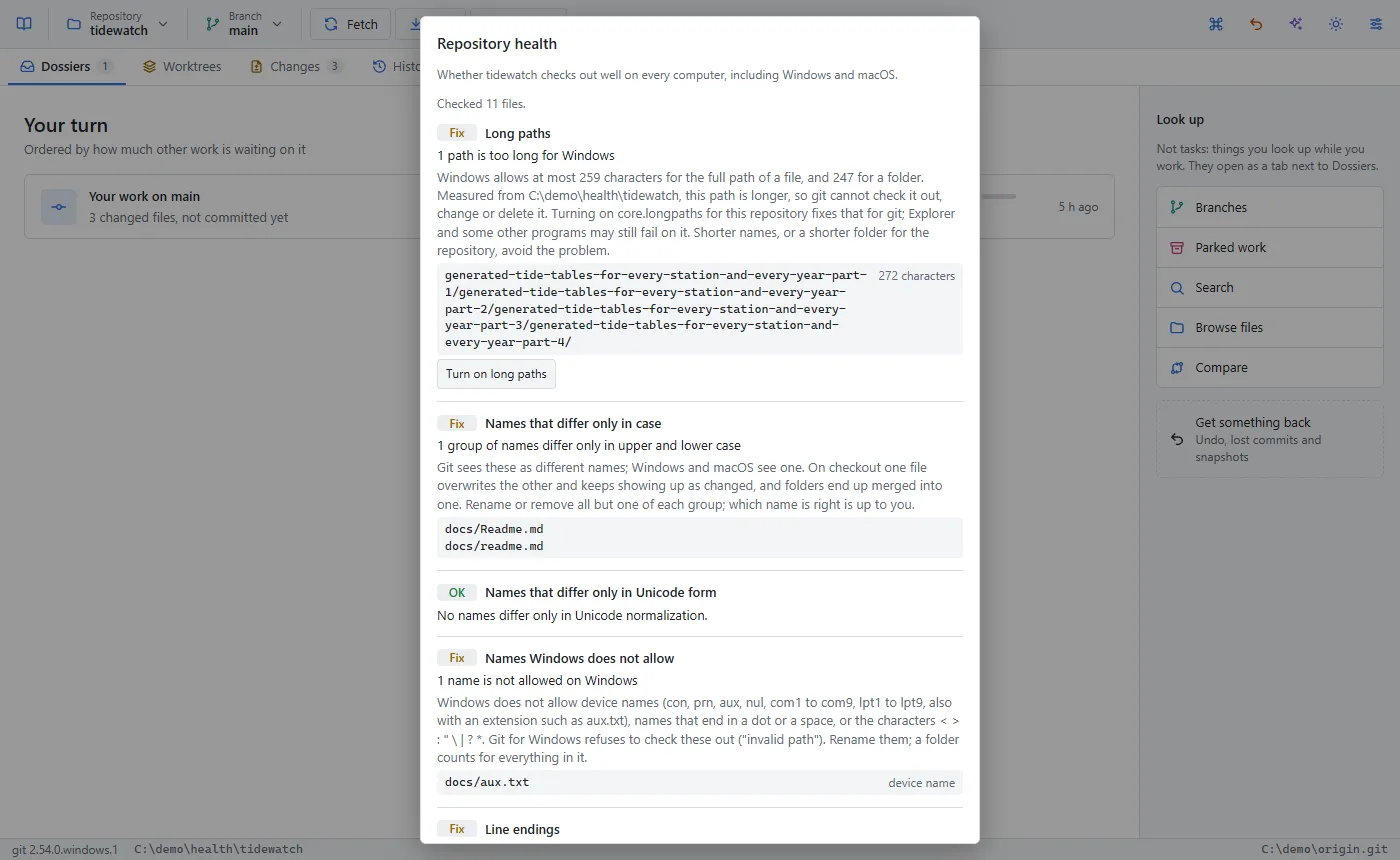
The checks, in the app’s words
Section titled “The checks, in the app’s words”Long paths. Windows allows 259 characters for the full path of a file, and 247 for a folder. The
app measures from the repository folder (on Windows) and lists what is too long, with the length.
It warns that git cannot check such paths out, change or delete them. On Windows, where it is a
Fix, a button Turn on long paths appears. It sets core.longpaths=true in the config of
this repository only, not in your global config, and it does not ask first: it is one click, and
the dialog confirms with “Turned on core.longpaths for this repository.” That helps git; Explorer
and some other programs may still fail on those paths. With it on, the check turns into a Note.
On Linux and macOS there is no button, only the advice that Windows colleagues need core.longpaths,
or shorter names.
Names that differ only in case. For example README.md and readme.md. Git sees two files;
Windows and macOS see one, so on checkout one overwrites the other and the file keeps showing as
changed. Folders end up merged. The app lists each group together. There is no button: rename or
remove all but one, because only you know which name is right.
Names that differ only in Unicode form. A letter like é can be one character (NFC) or an e
with a loose accent (NFD). They look the same, but git sees two names. macOS treats them as one, so
one file overwrites the other or keeps showing as changed. Each group is listed with its paths and
how each is written. The app knows the characters used in Latin, Greek, Cyrillic and Korean names; it
has no button, because only you know which name is right.
Names Windows does not allow. Device names (con, prn, aux, nul, com1 to com9,
lpt1 to lpt9, also with an extension such as aux.txt), names that end in a dot or a space,
and the characters < > : " \ | ? *. Each is listed as device name, ends in a dot or space
or character not allowed. Git for Windows refuses to check these out (“invalid path”). Rename
them; a folder counts for everything in it. No button.
Line endings. Windows writes a line break as two characters (CRLF), Linux and macOS as one (LF).
Without a rule in .gitattributes, what lands in the repository depends on the setting
core.autocrlf of whoever commits. The check counts text files without a rule and lists files stored
with CRLF (CRLF or mixed CRLF and LF). It also shows where core.autocrlf is set.
If rules are missing and .gitattributes is a normal file (or absent), Review .gitattributes…
shows a proposal: * text=auto at the top, plus *.sh text eol=lf and *.bat/*.cmd text eol=crlf for those extensions if the repository has them. Your existing rules stay at the end,
where they win. Write .gitattributes saves it in the repository folder. The app does not commit
it; do that in Changes. Files already stored with CRLF stay that way until you renormalize them and commit, which touches
every line of them, so do it in a commit of its own.
When every text file has a rule and files with CRLF remain in the index, Renormalize files…
appears. It first explains what it does and asks for confirmation. It runs git add --renormalize .:
every tracked file goes through the rules in .gitattributes again, and the result is staged in the
index. Nothing is committed: review it in Changes. Untracked files are not added, but changes you made
to tracked files in your working folder are staged too. It refuses while there are conflicts.
Large files. Files over 10 MB, largest first, with size and “binary” or “text”. Every version
of a large file stays in history, and every clone downloads them all. The advice is to use Git LFS
(Submodules and large files): git lfs track '*.ext' for new versions,
and git lfs migrate import for files already committed, which rewrites history. Files already in
LFS are not counted.
Git LFS. OK if the repository does not use it or git-lfs is installed. Fix if it uses LFS and git-lfs is missing.
When it is safe to ignore a finding
Section titled “When it is safe to ignore a finding”- Long paths when nobody on your team uses Windows. Mind that a colleague may start tomorrow.
- A reserved name or case collision in a repository that only you use, on Linux. It still breaks every Windows clone, so ignore it only if that is truly never going to happen.
- Large files that are small enough for your host and rarely change.
- Line endings: CRLF files in an all-Windows team that agree on
core.autocrlf.
A Note is by definition fine to leave. The app never changes anything on its own.
Undoing a fix
Section titled “Undoing a fix”Turn on long paths and Write .gitattributes appear in the Undo list, like other actions in the app.
Undoing the first puts core.longpaths back to what it was (or removes it if it wasn’t set); undoing the
second puts the old .gitattributes back, or deletes the file if there was none. If the setting or the
file has been changed again since, Undo refuses and leaves your newer choice alone. Renormalize files
is not in the list: it only changes the staging area, so unstage the files if you want them back.
Under the hood
Section titled “Under the hood”- The file list:
git ls-files --stage --eol -z, and onegit cat-file --batch-checkfor all sizes. Never a process per file. - Turn on long paths:
git config --local --replace-all -- core.longpaths true. - Renormalize files:
git add --renormalize .withGIT_LITERAL_PATHSPECS=0, because the app normally treats every path as literal and.would otherwise be a file called.. - Write .gitattributes: writes the file directly. If
.gitattributeschanged since the check, it refuses with a message and re-runs the check, so you never overwrite newer edits.
When it goes wrong
Section titled “When it goes wrong”- “.gitattributes changed in the meantime.” Someone (you, an editor) edited it after the check. The check ran again; review the new proposal.
- There is no Review button.
.gitattributesis not a normal file (a link or a folder), or all text files already have a rule. - Still failing on Windows with long paths on. Explorer and some programs ignore
core.longpaths. Shorten the names or move the repository to a shorter folder.