
Clean up your commits (interactive rebase)
The problem
Section titled “The problem”Your branch has the commits you actually made: “wip”, “fix typo”, “fix typo again”, “actually fix it”. Nobody reviewing your work benefits from that trail. You want three commits that each tell one clear story.
The idea
Section titled “The idea”Rebase rewrites a series of commits. Interactive means you decide what happens to each
one. In the terminal that means editing a text file full of pick lines. Here you do it by dragging.
For each commit after the starting point you choose:
| Action | What happens |
|---|---|
| Pick | Keep the commit as it is |
| Reword | Keep the changes, write a new message |
| Squash into above | Merge the commit into the one above it, and combine the messages |
| Fixup into above | The same, but throw this commit’s message away |
| Edit (stop here) | Pause the rebase at this commit, so you can change it before it continues |
| Drop | Remove the commit and its changes |
You can also change the order by dragging the commits up or down.
How to use it
Section titled “How to use it”-
Open History, right-click the oldest commit you want to change, and choose Interactive rebase from here…. That commit and every commit after it are listed, oldest first.
-
Drag commits into the order you want and set an action on each. The list is oldest first. Commits that will be squashed are shown joined to the one they merge into, and dropped commits are struck through.
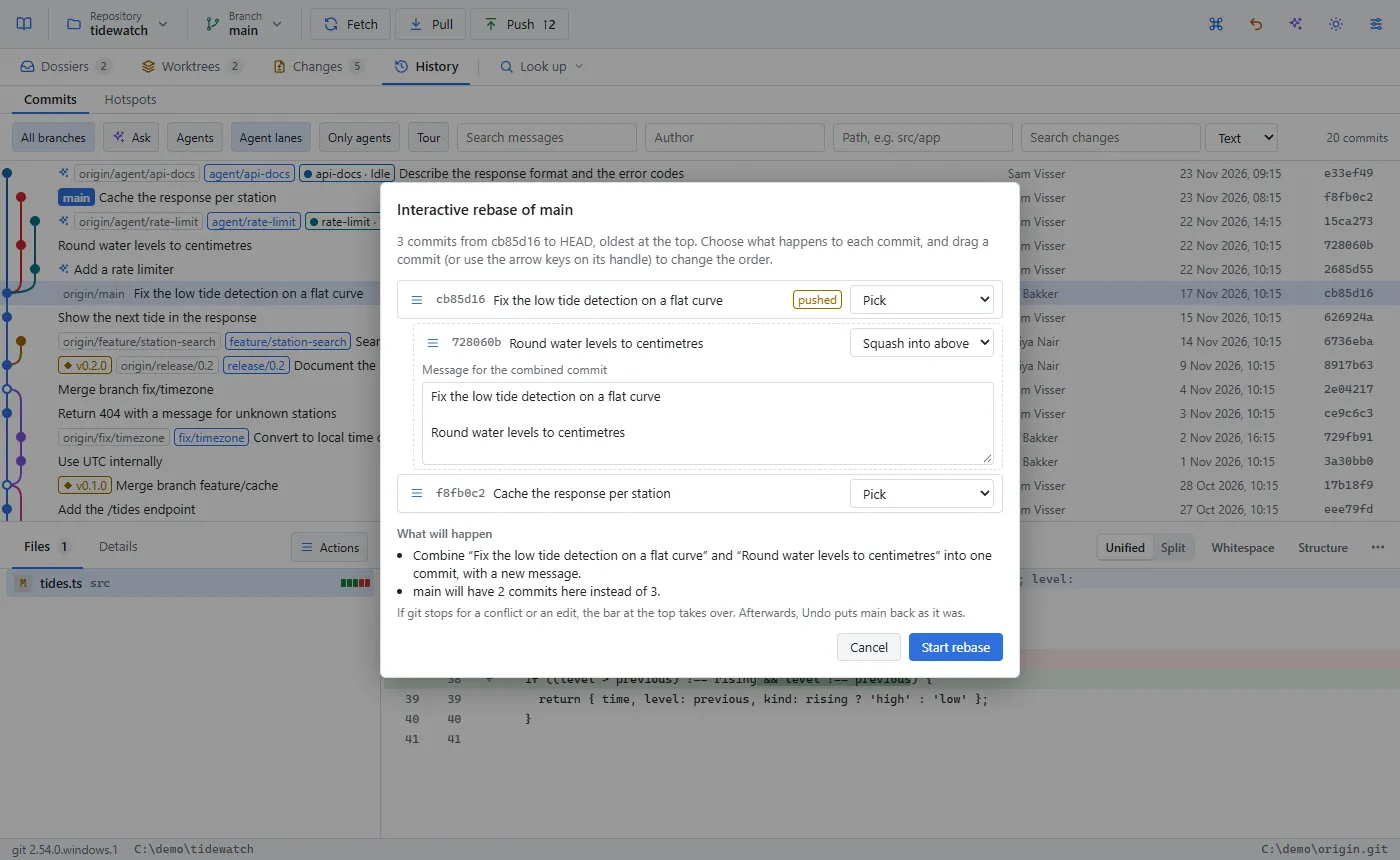
Under the list, the app tells you what will happen, for example that main will have 2 commits here instead of 3. A commit that is already on the remote is marked pushed, and you get a warning about the force-push that rewriting it needs.
-
Confirm. The app does the rebase.
-
If git stops because of a conflict, the bar at the top takes over and you resolve it in the merge editor. Afterwards, Undo puts the branch back exactly as it was.
Split one big commit into several
Section titled “Split one big commit into several”An agent often hands in one large commit, or a string of wip commits. Right-click the oldest commit you want to
replace and choose Split into commits from here…. The dialog starts with two commits, and everything goes into
the first one. You then:
- give each commit a message;
- pick, for each hunk (a block of changed lines) in each file, the commit it belongs to;
- or press One commit per file to start from a split by file.
A file that is new, deleted, renamed, binary or has a changed mode cannot be cut into hunks, so it goes into one commit as a whole. Each commit shows how many changes it holds, and the dialog tells you what is missing before it lets you split.
The app builds the new commits without touching your working tree or your staged changes, and only then moves the
branch. It first checks that the last new commit has exactly the same content as the old tip. If not, nothing is
changed. A commit does not have to compile on its own, so run your tests per commit if you care
(a rebase with --exec does that).
The new commits get your name and the current time, and no hooks run, because they are made with git commit-tree. If
commit.gpgsign is on, they are signed. Undo puts the old commits back.
Rules of thumb
Section titled “Rules of thumb”- Only rewrite commits you haven’t shared. Rebase gives commits new identities. If others have already pulled the old ones, their copies and yours no longer match, and you’d have to force-push.
- Small steps. Squash first, reword later. It is easier to follow what you did.
Safety
Section titled “Safety”Before an interactive rebase the app saves a snapshot of your uncommitted work,
and the old state of the branch stays in the reflog. Undo (Ctrl+Shift+Z) restores the branch to
before the rebase.
Under the hood
Section titled “Under the hood”The app runs git rebase -i, but supplies the todo file itself through GIT_SEQUENCE_EDITOR
instead of opening an editor, and the new messages through GIT_EDITOR.
When it goes wrong
Section titled “When it goes wrong”- The app refuses to start. There is a merge commit between this commit and HEAD. An interactive rebase only works on a straight line of commits, and the app doesn’t rebuild merges. Start from a commit after the merge.
- Git stops on a conflict or an edit. The bar at the top takes over. Resolve the conflict in the merge editor, then press Continue.
Related
Section titled “Related”Cherry-pick, revert and reset change history in other ways, one commit at a time.