
Compare two branches, tags or commits
The problem
Section titled “The problem”Before you merge, you want to know what you’re about to get. Which commits are new? Which files change? Is the other branch ahead of mine, behind, or both?
What you see
Section titled “What you see”Pick two refs, which can be branches, tags or commits. Compare shows:
- Commits only one side has. Two lists: what is in A but not in B, and what is in B but not in A. If one list is empty, one side simply contains the other.
- Files that changed, with their diffs. By default this is measured from the merge base (see below), like the Files changed tab of a pull request, so you see only what the branch itself did. You can also compare the two ends directly.
The merge base
Section titled “The merge base”Two branches that split from each other have a last commit in common: their merge base. Changes made on main after the split are not part of what your branch did, so a good comparison starts at the merge base and leaves them out. Comparing the two tips directly would show main’s later changes as if you had undone them.
How to use it
Section titled “How to use it”- In History, Ctrl+click two commits.
- Or right-click a branch or tag and choose Compare with…, then pick the other side.
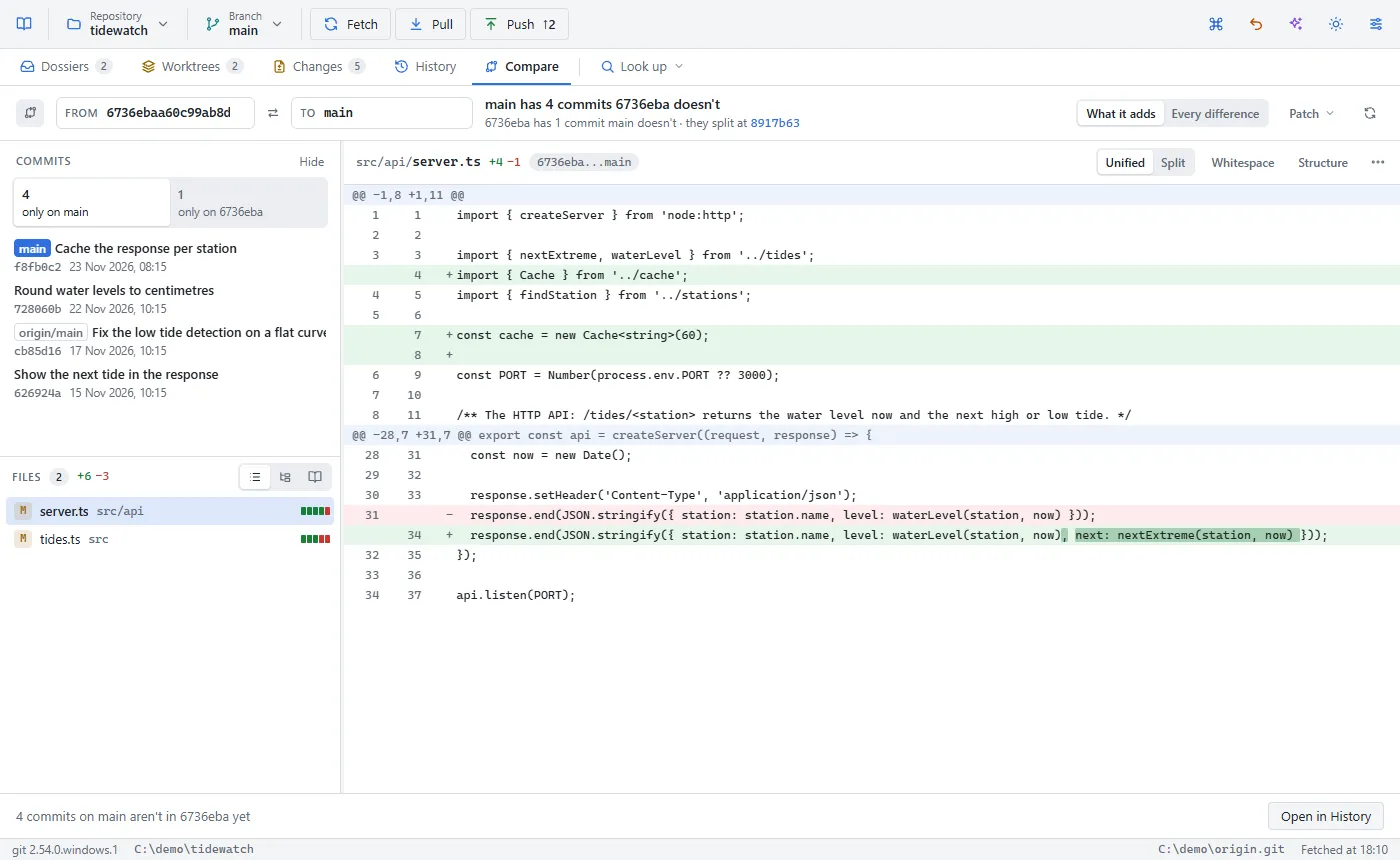
Since merge base and Direct switch between the two ways to measure the changes. The header also tells you how far apart the sides are, for example 4 commits ahead, 1 behind.
Above the files, List and Tree switch between a flat list and a tree of folders. For a big comparison the tree is easier to scan; the app remembers your choice.
Compare the work of an agent
Section titled “Compare the work of an agent”When the right-hand side (the one you compare) is a local branch, such as agent/api-docs, Compare does a bit more:
- Reading order appears next to List and Tree. It sorts the files in a fixed order (production code, tests, lockfiles, only reformatted), with a tick per file that you have read. See Review an agent’s work.
- Select lines in the diff and right-click for Comment on this line… (or these lines…). The comment is kept with the branch and you send it to the agent from its merge dossier. See Comment on lines and send them back.
The diff also has the Structure switch, which shows files that only moved, files that only changed in whitespace, and blocks of lines that moved (see Stage and commit exactly what you mean).
Under the hood
Section titled “Under the hood”The two commit lists are git log A..B and git log B..A. The pull-request style file list is
git diff A...B (three dots: from the merge base), and the direct comparison is git diff A B.
Related
Section titled “Related”The same idea warns you when two Claude Code agents would change the same files, before either has merged.