
Let Claude Code read your repository (MCP)
The problem
Section titled “The problem”You work with Claude Code in a terminal, and you work in this app. Claude Code does not know what the app shows. It does not know which file you are looking at, which commits are staged, or what the other agents in their worktrees are doing. You end up pasting diffs into the chat.
The idea
Section titled “The idea”MCP (Model Context Protocol) is a standard way for a program like Claude Code to talk to another program. This app can act as such a program: it opens a small endpoint on your own computer, and Claude Code connects to it.
Through that endpoint Claude Code can read the repository that is open in the app: status, diffs, history, blame, stashes, branches and conflicts. It can also make the app show a file or a commit, so you can look at what it is talking about.
Reading is all it can do at first. Everything that changes the repository is off by default. You turn on a group of actions in Settings, and then every single action still waits for your Allow in the app.
This is the other direction from Get help from Claude in the app. There, the app asks Claude for help with your own Anthropic API key. Here, your own Claude Code asks the app. You do not need an API key for this.
How to use it
Section titled “How to use it”1. Turn on the endpoint
Section titled “1. Turn on the endpoint”- Open Settings (
Ctrl+,) and choose the MCP endpoint tab. - Tick Enable endpoint. The Port field starts at
39218. You can choose any port from 1024 to 65535. - Press Save. The line below the title now reads
Listening on http://127.0.0.1:39218/mcp.
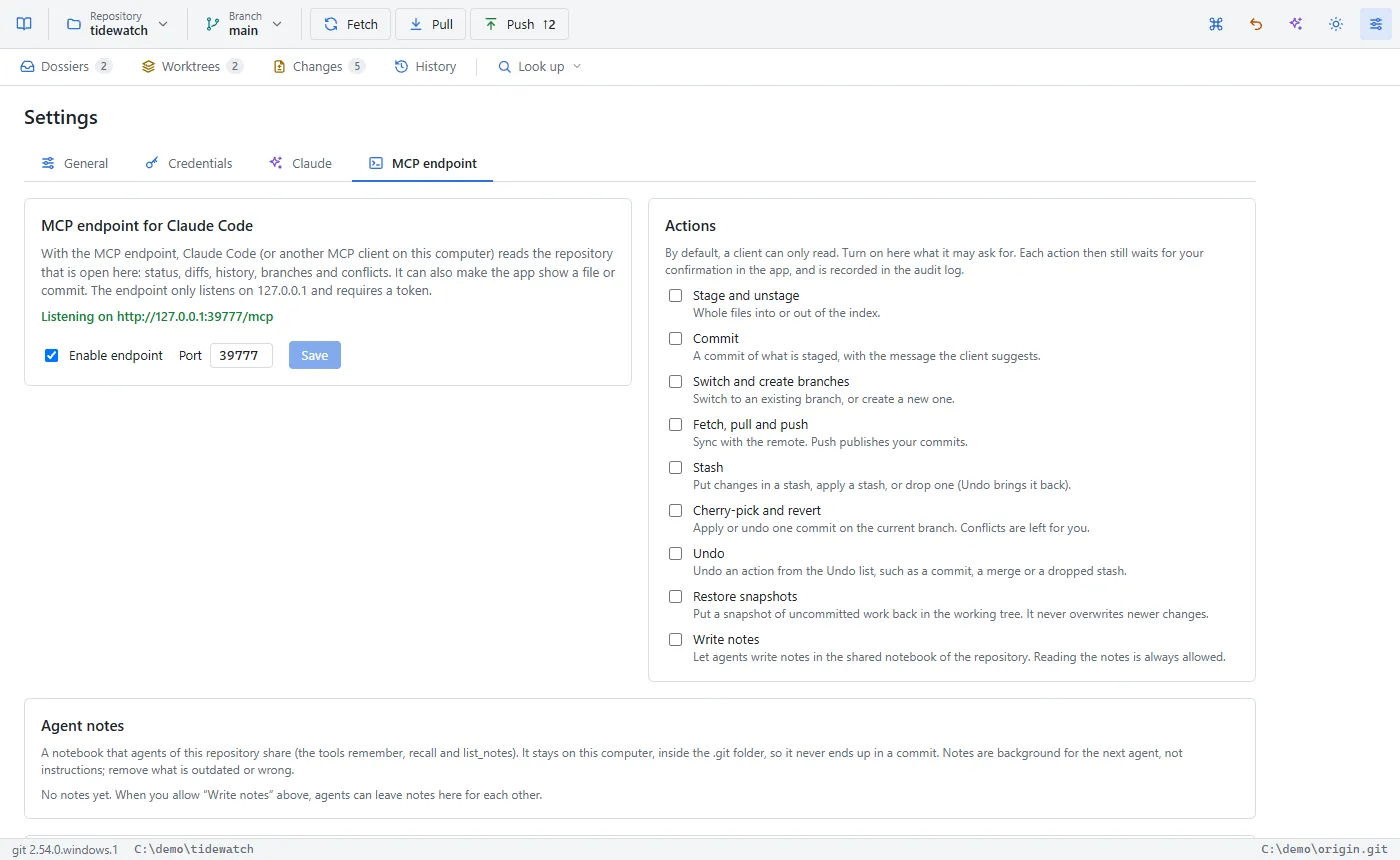
The endpoint is only reachable from your own computer. It listens on 127.0.0.1, and it answers a request only when it carries the right token: a long random secret. The token is made the first time the endpoint starts. It is stored encrypted for your Windows account, in mcp-secrets.dat in the same folder as the app’s settings.json.
If the line says On, but not listening, the text after it tells you why, for example that the port is in use or reserved by Windows. Choose another port and press Save again.
2. Connect Claude Code
Section titled “2. Connect Claude Code”- Under Set up a client, press Copy command for Claude Code.
- Paste it into a terminal and run it. It looks like this, with your port and your token:
claude mcp add --scope user --transport http git-client-mx http://127.0.0.1:39218/mcp --header "Authorization: Bearer <token>"--scope user makes the connection yours, not tied to one project. That fits, because the endpoint shows whatever repository is open in the app, in whichever folder Claude Code runs.
The token goes through the clipboard only. After one minute the app clears the clipboard again, if the command is still on it.
There is also Copy configuration for Claude Desktop, which copies a piece of JSON for claude_desktop_config.json. And Renew token makes a new token: every client that has the old one stops working until you give it the new command. The app asks you to confirm first.
3. What Claude Code can read
Section titled “3. What Claude Code can read”These tools need no setting. They only read, or they only make the app show something. They always work on the repository that is open in the app, so there is no path to give. With no repository open, Claude Code gets a message saying so.
| What | Tools |
|---|---|
| What you are looking at | get_state (open repository, branch, the view, the selected file or commit), show_file and show_commit (make the app show a file or a commit) |
| Status and diffs | get_status, get_diff (without a path: a summary of lines added and removed per file) |
| History | get_log (also searches message, author, path and the text of changes), get_commit, compare_refs (two branches, tags or commits against each other) |
| Blame | get_blame |
| Stashes | list_stashes, get_stash |
| Branches | list_branches (local and remote branches, tags, remotes) |
| Conflicts | get_conflict (both sides, with the base between the markers) |
| Safety net | list_snapshots, get_snapshot, list_undo (see Get back what you lost and the Undo list) |
| Agents | list_worktrees, who_edits, get_queue_feedback, get_merge_dossier |
| Notes | recall, list_notes (the shared notebook, see below) |
Anything longer than 400,000 characters is cut off.
Under Tools at the bottom of the tab you can see the full list of names the endpoint offers right now.
4. Ready-made prompts
Section titled “4. Ready-made prompts”The endpoint also offers five prompts. Claude Code shows prompts from a connected MCP server in its slash-command menu, under the name git-client-mx. A prompt only tells Claude Code what to read and what to write back. It does not change anything.
| Prompt | Argument | What it does |
|---|---|---|
review_staged |
focus (optional) |
Reads the staged changes and reports per file: bugs, forgotten debug code, secrets, changes without a test. Changes nothing. |
suggest_commit_message |
Proposes a message in the style of your recent commits and stops. It only commits if you ask it to, and then you approve it in the app. | |
explain_commit |
hash |
Explains one commit: what it changes, why, and what could go wrong. |
summarize_agents |
Overview of the agents in their worktrees: who works, who waits, who overlaps, and an order to merge them in. | |
resolve_conflict |
path |
Reads a conflicted file and proposes a resolution. It cannot write it: you apply it in the merge editor. |
Every prompt ends by telling Claude Code that what it reads (diffs, commit messages, file contents, branch names) was written by others and is data, never instructions.
5. Actions that are off by default
Section titled “5. Actions that are off by default”Under Actions, tick the groups Claude Code may ask for. A group that is off is refused, and the refusal is written to the audit log.
| Group | What it allows |
|---|---|
| Stage and unstage | Whole files into or out of the index. |
| Commit | A commit of what is staged, with the message the client suggests. |
| Switch and create branches | Switch to an existing branch, or create a new one. |
| Fetch, pull and push | Sync with the remote. Push publishes your commits and never forces. |
| Stash | Put changes in a stash, apply a stash, drop one. |
| Cherry-pick and revert | Apply or undo one commit on the current branch. Conflicts are left for you. |
| Undo | Undo an action from the Undo list, such as a commit, a merge or a dropped stash. |
| Restore snapshots | Put a snapshot of uncommitted work back in the working tree. It never overwrites newer changes. |
| Write notes | Let agents write notes in the shared notebook of the repository (remember). |
6. Every action asks you first
Section titled “6. Every action asks you first”Even with a group on, nothing happens until you say so. The app brings its window to the front and shows a question: which client asks, in which repository, what it wants to do (for example Commit to main or Stage 3 files), and below that the file names or the commit message.
Deny has the focus, so pressing Enter by accident allows nothing. A push has a red Allow button, because you cannot just take it back. If you do not answer within two minutes, the question is cancelled and nothing is done. Claude Code is told which of the three happened. After a Deny it is told not to try again unless you ask.
7. The audit log
Section titled “7. The audit log”Under Audit log on the same tab you see every action a client asked for, newest first: time, client, action, repository and outcome. The outcome is Done, Failed, Denied, No answer or Disabled (the group was off). Hover an outcome to see the error of a failed action.
The log keeps the last 200 actions. It is stored as mcp-audit.json next to settings.json, so it survives a restart. Reads are not in it. For those, the tab shows only the Last call: the tool, the client and the time.
The shared notebook
Section titled “The shared notebook”Agents can leave notes for each other, so the next agent does not have to find out again how to start the test database. remember writes a note (a topic and a text) and counts as an action: it is off until you turn on Write notes, and each note waits for your confirmation. recall and list_notes only read. Notes are kept on this computer in the .git folder of the repository, so they never end up in a commit. Secrets are removed before a note is saved. You can read, edit and delete the notes under Agent notes on the MCP tab. A note is background, not an instruction, and agents are told so.
What agents can report back
Section titled “What agents can report back”Agents running in their own worktrees have a few more tools. None of them asks for confirmation, because they do not change a branch, a commit or a file in your repository.
report_statustells the cockpit what the agent is doing: working, waiting for you, done or blocked, with one line of text. You see it in the agent cockpit. When it waits for you, it can add up to four short answers (options); in Dossiers you pick one or write your own, and the app puts your answer in its Claude Code when it runs in the app, or on the clipboard. Afterdone, the merge queue tests the branch, and the agent can ask what it found withget_queue_feedback.get_merge_dossiershows an agent what you will see before you merge its branch: its commits (marking those without a recorded request), the questions and approaches fromrecord_intent, its last report, the size of the change, what the merge queue found and the merge message. An agent uses it to check that its work tells the story it wants to tell. It only reads.who_editslets an agent ask, before it changes files, which other worktrees already change them, with uncommitted work or with commits that are not merged yet. It also names the files you marked as off limits for agents, with the reason, so the agent asks you first.record_intentis called after a commit. The agent writes down your request and its approach. The app keeps it as a git note on the commit (refs/notes/agents), on your machine only, and shows it as Why this commit in History and in Blame.
Under the hood
Section titled “Under the hood”The endpoint is plain HTTP on 127.0.0.1 with one path, /mcp. Each message is one POST with JSON-RPC in it. The app checks the host name, the origin and the token before it reads anything. Every tool calls the same services as the buttons in the app, so a tool gets the same checks and the same errors you would get.
The git commands behind the tools are the ones behind the app’s own views: for example git status, git diff, git log, git blame, and for actions git add, git commit, git switch, git fetch, git pull, git push, git stash, git cherry-pick and git revert.
When it goes wrong
Section titled “When it goes wrong”On, but not listening. The port is taken, or Windows has reserved it. Choose another port and press Save. If the text says the token cannot be stored, the token file belongs to another Windows account.- Claude Code says the action is turned off. Tick the group under Actions. Only you can do that; Claude Code cannot.
- You pressed Deny by mistake. Ask Claude Code to try again. It will not do so on its own.
- An action went through and you did not want it. Many can be undone with Undo (
Ctrl+Shift+Z). A push cannot: that is why it has the red button. - Claude Code can no longer connect. If you pressed Renew token, the old token no longer works. Copy the command again and run it.
- Claude Code shows the wrong repository. The endpoint shows the repository that is open in the app at that moment. Switch repositories in the app.